|
|
MiddleButtonJH v1.9.0
Mouse middle-button utility for Mastercam.
[ What's New in v1.9.0 ]
1. Mastercam-only mouse customization
- MiddleButtonJH mouse functions are now applied only inside Mastercam.
- Outside Mastercam, the original Windows and application mouse behavior is preserved.
2. Mouse wheel speed behavior improved
- Custom wheel speed is now applied only inside Mastercam.
- Windows Explorer, web browsers, and other applications continue to use their normal system/application wheel settings.
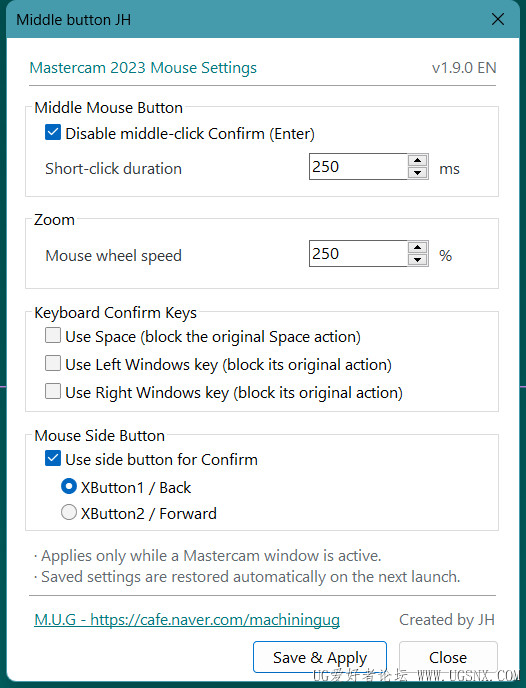
3. Side button confirmation feature added
- XButton1 or XButton2 can be selected and used as the confirmation action inside Mastercam.
- The side button feature is disabled by default.
- Outside Mastercam, the original Back/Forward button behavior is preserved.
4. Settings UI improved
- The settings window layout and visual style have been cleaned up.
- Unnecessary gray backgrounds were removed and readability was improved.
- Existing functions and settings behavior remain unchanged.
5. Backward-compatible settings
- Existing v1.8.x settings files can be used without reset.
- Previous user settings are preserved.
[ Notes ]
- The existing middle-button confirmation function is still available.
- You can disable the middle-button confirmation function and use a mouse side button instead.
- Mouse-related custom settings are applied only inside Mastercam.
[ Installation ]
Close Mastercam before updating.
Replace MiddleButtonJH.dll and the related files with the new version,
then restart Mastercam.
Your existing settings.ini can be kept and reused.
Version: 1.9.0
--------------------------------------------------------------------------------------------------------------------------
MiddleButtonJH v1.9.0
Mastercam 鼠标中键辅助插件。
[ v1.9.0 主要更新 ]
1. 鼠标功能仅在 Mastercam 内生效
- MiddleButtonJH 的鼠标相关功能现在只在 Mastercam 内生效。
- 在 Mastercam 以外的程序中,将保持 Windows 及各程序原本的鼠标行为。
2. 鼠标滚轮速度功能改进
- 自定义滚轮速度现在只在 Mastercam 内应用。
- Windows 资源管理器、浏览器及其他软件继续使用原有的系统或程序滚轮设置。
3. 新增鼠标侧键确认功能
- 可选择 XButton1 或 XButton2 作为 Mastercam 内的确认功能。
- 鼠标侧键功能默认关闭。
- 在 Mastercam 以外,侧键仍保持原有的后退/前进功能。
4. 设置界面优化
- 整理了设置窗口的布局和视觉样式。
- 减少了不必要的灰色背景,提高了整体可读性。
- 原有功能及设置方式保持不变。
5. 兼容旧版设置
- 可继续使用 v1.8.x 的原有设置文件。
- 更新后不会清除原来的用户设置。
[ 说明 ]
- 原有的鼠标中键确认功能仍然可以继续使用。
- 也可以关闭中键确认功能,改用鼠标侧键作为确认键。
- 所有鼠标相关的自定义设置仅在 Mastercam 内生效。
[ 安装方法 ]
更新前请先关闭 Mastercam。
将 MiddleButtonJH.dll 及相关文件替换为新版本,
然后重新启动 Mastercam。
原有的 settings.ini 可以继续保留并使用。
Version: 1.9.0
|
|



 发表于
发表于