|
|
Post Title
==========
Middle Button JH v1.8.5 International Edition for Mastercam 2021-2027
Distribution Post
=================
Middle Button JH is a lightweight C-Hook utility that improves mouse and keyboard confirmation controls in Mastercam.
Compatibility has been tested successfully with Mastercam 2021 through Mastercam 2027.
Key Features
------------
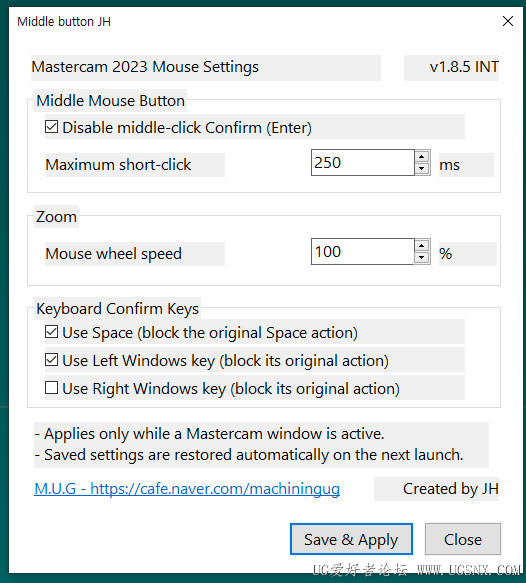
- Short-click the middle mouse button to run Confirm (Enter).
- Adjust the middle-button short-click duration from 80 to 1000 ms.
- Adjust mouse-wheel zoom speed from 25% to 500%.
- Use Space, Left Windows key, or Right Windows key as a Confirm key.
- Enable each keyboard Confirm key independently.
- Block the original action of enabled keys only while Mastercam is active.
- Restore saved settings automatically whenever Mastercam starts.
Tested Mastercam Versions
-------------------------
- Mastercam 2021
- Mastercam 2022
- Mastercam 2023
- Mastercam 2024
- Mastercam 2025
- Mastercam 2026
- Mastercam 2027
Supported Interface Languages
-----------------------------
- English
- Korean
- Simplified Chinese
- Traditional Chinese
- Japanese
The settings window uses English. Mastercam confirmation, completion, execution, add, and continue buttons are recognized in all five supported languages.
Installation
------------
1. Close Mastercam completely.
2. Open the CHOOKS folder for the Mastercam version you want to use.
3. Remove any previous test files named Mastercam2023MouseControl.dll and Mastercam2023MouseControl.ft, if present.
4. Copy MiddleButtonJH.dll and MiddleButtonJH.ft into the CHOOKS folder.
5. Start Mastercam.
The same files can be installed separately in the CHOOKS folder of each Mastercam version from 2021 through 2027.
Opening the Settings Window
---------------------------
1. Open Mastercam's Customize interface.
2. Find the "Middle button JH" category.
3. Run the "Middle button JH" command.
4. Select the desired options.
5. Click "Save & Apply".
The feature starts automatically when Mastercam loads the DLL. The command is only used to open the settings window.
Important Notes
---------------
- Compatibility has been tested with Mastercam 2021-2027.
- Do not install this build together with an older .NET test version. Duplicate installations may process mouse input more than once.
- Some Windows security shortcuts are handled directly by the operating system and may not be intercepted.
- If multiple Mastercam versions are installed, copy the DLL and FT file into each version's own CHOOKS folder.
Version
-------
Middle Button JH v1.8.5 International Edition
 Mastercam2023_Middle_button_JH_International_v1.8.5.zip
(85.85 KB, 下载次数: 106)
Mastercam2023_Middle_button_JH_International_v1.8.5.zip
(85.85 KB, 下载次数: 106)
|
|



 发表于 2026-8-16 09:34:47